최종 코드
1. 헤더
#ifndef IMAGE_PROCESSING_H_
#define IMAGE_PROCESSING_H_

#include <ros/ros.h>
#include <sensor_msgs/Image.h>
#include <image_transport/image_transport.h>
#include <opencv2/highgui/highgui.hpp>
#include <cv_bridge/cv_bridge.h>
#include <opencv2/opencv.hpp>
#include <iostream>
#include "opencv2/imgproc/imgproc.hpp"

using namespace std;
using namespace cv;
class image_process {

    private:
        ros::Publisher pub;
        image_transport::Subscriber sub_img;
	    cv_bridge::CvImagePtr cv_ptr;
		int minHue,maxHue;
		int minSat,maxSat;
		int minVal,maxVal;
		int centerX,centerY;
        int error_x, error_y;
		bool flag;//object dection yes or no?
	public:
        image_process(image_transport::ImageTransport *it);
        void ImageCallback(const sensor_msgs::Image::ConstPtr &img);
		void image_tracking();
		void calc_error(int y, int x);
		void print();
};

#endif
2. image.cpp
#include "image_processing.h"


image_process::image_process(image_transport::ImageTransport *it){
		flag=false;
        sub_img=it->subscribe("/image_raw",1,&image_process::ImageCallback, this);

		auto const MASK_WINDOW="mask setting";
		namedWindow(MASK_WINDOW, CV_WINDOW_AUTOSIZE);

		 minHue = 36, maxHue = 97;
    	 minSat = 74, maxSat = 255;
    	 minVal =  0, maxVal = 255;

		cvCreateTrackbar("Min Hue", MASK_WINDOW, &minHue, 179);
    	cvCreateTrackbar("Max Hue", MASK_WINDOW, &maxHue, 179);
    	cvCreateTrackbar("Min Sat", MASK_WINDOW, &minSat, 255);
    	cvCreateTrackbar("Max Sat", MASK_WINDOW, &maxSat, 255);
    	cvCreateTrackbar("Min Val", MASK_WINDOW, &minVal, 255);
    	cvCreateTrackbar("Max Val", MASK_WINDOW, &maxVal, 255);

}
void image_process::calc_error(int y, int x){
	error_x=centerX - x;
	error_y=-(centerY - y);

}
void image_process::print(){
		cout << "error_x:" << error_x << endl;
		cout << "error_y:" << error_y << endl;
		cout << "flag:" << flag <<endl;
		cout <<"----------------------" << endl;
}

void image_process::image_tracking(){

		Mat inputVideo;
		inputVideo=cv_ptr->image.clone();
	 	cv::Mat inputVideoHSV;
        cv::cvtColor(inputVideo, inputVideoHSV, cv::COLOR_BGR2HSV);

        //// 4. Create mask and result (masked) video
        Mat mask;
        // params: input array, lower boundary array, upper boundary array, output array
        inRange(
            inputVideoHSV,
            cv::Scalar(minHue, minSat, minVal),
            cv::Scalar(maxHue, maxSat, maxVal),
            mask
        );
        Mat resultVideo;
        // params: src1	array, src2 array, output array, mask
        bitwise_and(inputVideo, inputVideo, resultVideo, mask);
		Mat img_labels, stats, centroids;
		int numOfLabels=connectedComponentsWithStats(mask,img_labels, stats, centroids, 8, CV_32S);
		for (int j=1;j< numOfLabels; j++)
		{
			int area = stats.at<int>(j, CC_STAT_AREA);
			int left = stats.at<int>(j, CC_STAT_LEFT);
			int top = stats.at<int>(j, CC_STAT_TOP);
			int width = stats.at<int>(j, CC_STAT_WIDTH);
			int height = stats.at<int>(j, CC_STAT_HEIGHT);

			centerX = centroids.at<double>(j,0);
			centerY = centroids.at<double>(j,1);

			if (area >100)
			{
				flag=true;
				circle(inputVideo, Point(centerX, centerY), 5, Scalar(0, 0, 255), 2);
				rectangle(inputVideo, Point(left, top), Point(left+width, top + height) , Scalar(0,0, 255), 1);
                calc_error(inputVideo.rows/2, inputVideo.cols/2);
			}else{
				flag=false;
			}

		}
		line(inputVideo, Point(0,inputVideo.rows/2), Point(inputVideo.cols,inputVideo.rows/2), Scalar(255, 0, 0), 1);
		line(inputVideo, Point(inputVideo.cols/2, 0), Point(inputVideo.cols/2,inputVideo.rows), Scalar(255, 0, 0), 1);
        //// 5. Show videos
        imshow("Input Video", inputVideo);
        imshow("Result (Masked) Video", resultVideo);
        imshow("Mask", mask);

        //// Wait for 'esc' (27) key press for 30ms. If pressed, end program.
        waitKey(1);

}


void image_process::ImageCallback(const sensor_msgs::Image::ConstPtr &img){

       // ROS_INFO("image(%d %d)", img->width, img->height);
		print();
        try{
                cv_ptr=cv_bridge::toCvCopy(img, sensor_msgs::image_encodings::BGR8);
				image_tracking();
			//	cout << img_.rows << endl;
        } catch(cv_bridge::Exception &e){
                ROS_ERROR("error");

                return;
        }
}

int main(int argc, char **argv){

        ros::init(argc, argv, "main");
        ros::NodeHandle nh;

        image_transport::ImageTransport it(nh);
        image_process ob=image_process(&it);

        ros::spin();

	  }
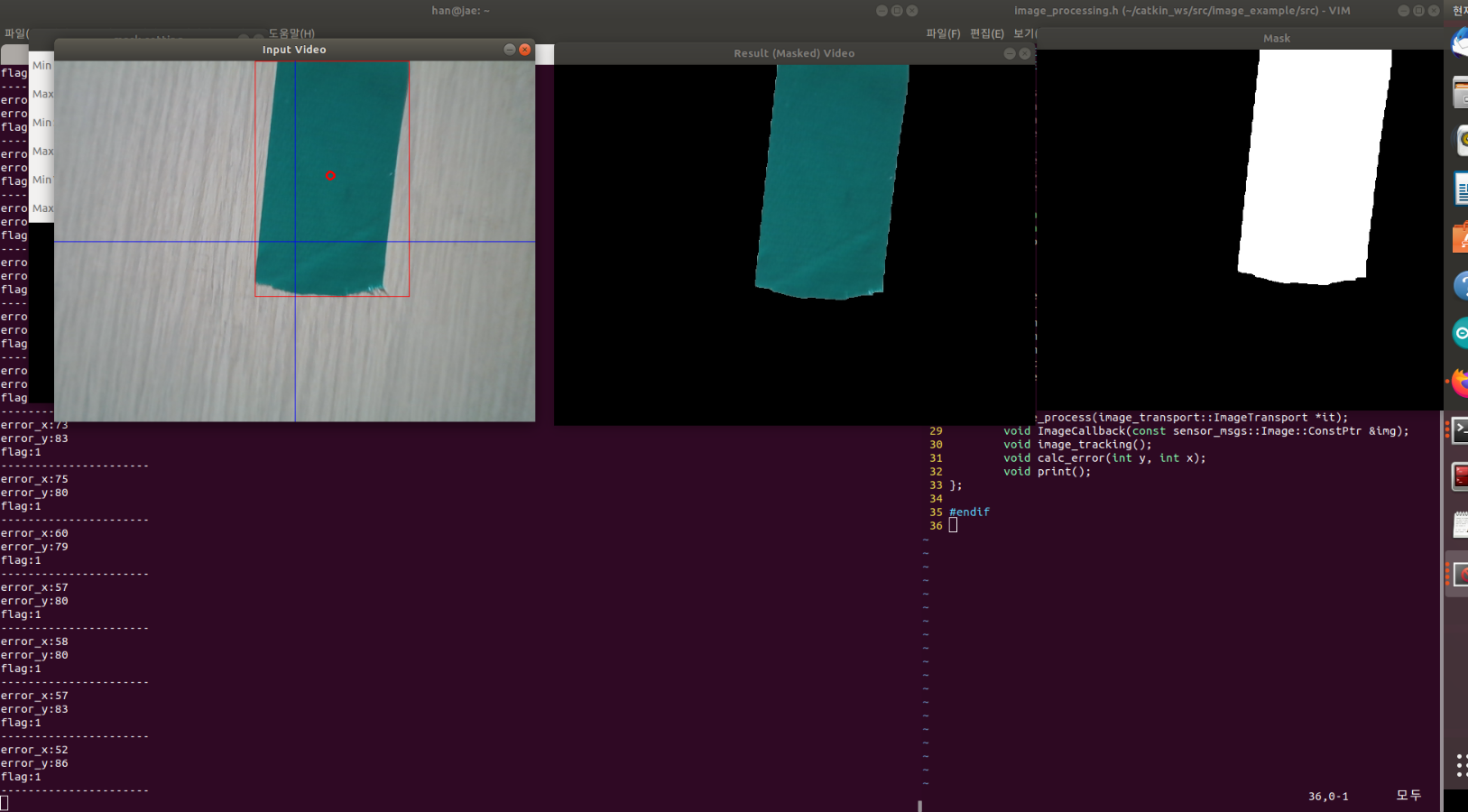
결과 따란~~~~~
'대외활동 > irc src 씨름로봇' 카테고리의 다른 글
| [씨름로봇] 영상처리- color tracking(1) (0) | 2022.10.10 |
|---|---|
| [씨름로봇] 색 기반 물체 추적 -PID제어로 서보모터 제어 (0) | 2022.10.03 |
| [씨름로봇 ] 색 기반 물체 추적기 (티스토리 초보) (1) | 2022.10.03 |


